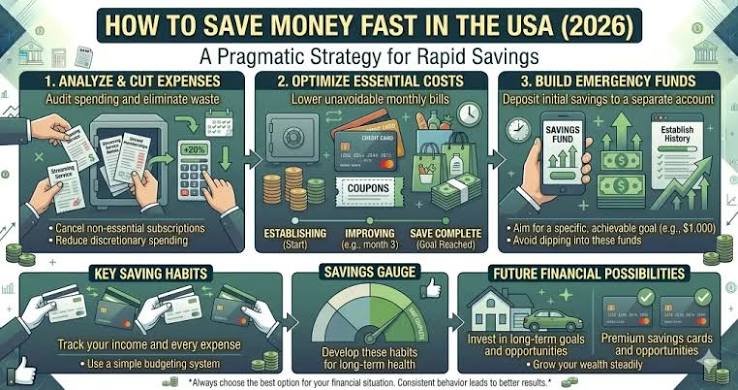
Saving money does not have to be complicated. You do not need a strict budget, a high income, or a completely different lifestyle to start building better financial habits. In many cases, simple changes to the way you spend, save, and manage your money can make a noticeable difference over time.
Whether you are trying to build an emergency fund, reduce financial stress, pay down debt, or prepare for a future goal, using a few simple saving strategies can help you make steady progress.
The most effective approach is to choose strategies that fit your lifestyle and are easy to maintain. A small amount saved consistently can be more valuable than an ambitious plan that you abandon after a few weeks.
What Are Simple Saving Strategies?
Simple saving strategies are practical habits that help you reduce unnecessary spending and consistently set aside money.
These strategies can include:
- Creating a basic budget
- Tracking your expenses
- Automating savings
- Reducing subscriptions
- Planning meals
- Avoiding impulse purchases
- Comparing prices
- Setting savings goals
The goal is not to eliminate every expense. Instead, you want to become more intentional about where your money goes.
1. Set a Clear Savings Goal
One of the easiest ways to stay motivated is to give your savings a purpose.
Instead of saying, “I want to save more,” choose a specific goal.
For example:
- Save $500 for emergencies
- Save $1,000 for unexpected expenses
- Save for a vacation
- Save for a car
- Build a home down payment
- Prepare for annual bills
A specific target makes it easier to measure progress.
You can also break a large goal into smaller milestones.
If your goal is to save $1,000 in 10 months, your target would be $100 per month.
Breaking the goal into smaller amounts makes it feel much more manageable.
2. Create a Simple Budget
A budget gives your money a purpose before you spend it.
Start by calculating your monthly take-home income. Then list your essential expenses, including housing, utilities, groceries, transportation, insurance, and debt payments.
After that, look at flexible expenses such as restaurants, entertainment, shopping, and subscriptions.
You do not need a complicated budgeting system.
A simple spreadsheet or notes app can be enough to understand your financial situation.
The important thing is knowing how much money you have available and deciding how much you want to save.
3. Track Your Spending
Tracking your spending can reveal habits you may not notice otherwise.
For one month, write down every purchase you make.
Include small expenses such as:
- Coffee
- Snacks
- Takeout
- Online shopping
- Delivery fees
- Entertainment
- Convenience purchases
At the end of the month, review your spending.
Look for categories where you spend more than expected.
Once you identify those patterns, choose one or two areas to reduce.
You do not need to eliminate every small expense. Focus on spending that does not provide enough value for the money.
4. Automate Your Savings
Automation is one of the simplest ways to save consistently.
Set up an automatic transfer from your checking account to your savings account.
You can schedule the transfer after every paycheck or once a month.
For example, saving $50 per week would result in approximately $2,600 over a year.
You can start with a smaller amount if necessary.
The important thing is making saving automatic so you do not have to rely on willpower.
5. Pay Yourself First
Instead of saving whatever remains after paying for everything else, put money into savings first.
For example, if your paycheck is $2,000 and you want to save $200, move the $200 into savings before spending the remaining money.
This approach makes saving a priority.
It also encourages you to build your lifestyle around the money that remains rather than spending everything and hoping something is left over.
6. Cancel Unused Subscriptions
Recurring subscriptions can quietly reduce your savings every month.
Review your bank and credit card statements and identify all recurring payments.
Look for:
- Streaming services
- Gym memberships
- Apps
- Software
- Gaming subscriptions
- Online memberships
- Other recurring services
Ask yourself whether you actually use each one.
If you rarely use a service, consider canceling it.
Even small reductions can create meaningful annual savings.
7. Cook More Meals at Home
Food is a practical area where many people can reduce spending.
Restaurant meals and delivery can become expensive when you add taxes, tips, and service charges.
Cooking at home does not need to be complicated.
Prepare simple meals that use affordable ingredients and can be stored for later.
You can also prepare larger portions and use leftovers for lunch.
You do not have to stop eating out completely. Instead, make restaurant meals an intentional part of your budget.
8. Make a Grocery List
A grocery list can help prevent unnecessary purchases.
Before shopping, check what you already have at home.
Then plan several meals and write down the ingredients you need.
Try to stick to the list as much as possible.
You can also compare prices and choose store-brand products when they offer good value.
Meal planning can help reduce food waste and make grocery spending more predictable.
9. Use the 24-Hour Rule
Impulse purchases can make saving difficult.
Before buying something that is not essential, wait 24 hours.
For expensive purchases, consider waiting several days or even a week.
During that time, ask yourself whether you actually need the item.
If you still want it later and the purchase fits your budget, you can make a more thoughtful decision.
A short waiting period can prevent many unnecessary purchases.
10. Reduce Takeout and Restaurant Spending
You do not have to completely eliminate restaurants to save money.
Instead, reduce how frequently you eat out.
If you currently order takeout several times per week, try reducing it by one or two meals.
You could also establish a monthly restaurant budget.
This allows you to enjoy eating out while preventing it from taking over your food budget.
11. Compare Prices Before Major Purchases
Before making an expensive purchase, compare prices from several sellers.
This can be useful when buying:
- Electronics
- Appliances
- Furniture
- Travel
- Insurance
- Services
Do not focus only on the cheapest price.
Consider quality, durability, warranty, and long-term value.
A slightly more expensive product that lasts significantly longer may ultimately cost less than repeatedly replacing a cheaper item.
12. Buy Used When Appropriate
Buying secondhand can be an effective way to reduce costs.
Depending on the product, consider looking for used furniture, books, clothing, tools, exercise equipment, and other household items.
Before purchasing anything used, inspect its condition and make sure the price represents good value.
For safety-critical products, carefully consider whether buying new is more appropriate.
13. Reduce Transportation Costs
Transportation can take up a significant portion of a monthly budget.
Review how much you spend on fuel, parking, insurance, maintenance, rideshares, and public transportation.
Depending on your circumstances, you might save money by:
- Walking short distances
- Cycling
- Using public transportation
- Carpooling
- Combining errands
- Reducing unnecessary trips
Even small changes can add up over a year.
14. Find Free Entertainment
Saving money does not mean giving up entertainment.
There are many activities that cost little or nothing.
Consider:
- Parks
- Hiking
- Libraries
- Free community events
- Local festivals
- Free museum days
- Home movie nights
- Board games
- Cooking with friends
You can also create a specific entertainment budget so you know how much you can comfortably spend.
15. Sell Unused Items
Look around your home for things you no longer use.
You may find clothing, electronics, furniture, books, appliances, tools, or other items that could be sold.
Selling unused items can provide extra money while also reducing clutter.
Consider putting the money directly into savings.
This turns things you no longer need into progress toward a financial goal.
16. Reduce Recurring Bills
Review your regular monthly bills and look for opportunities to reduce them.
Consider reviewing:
- Phone plans
- Internet plans
- Insurance
- Memberships
- Streaming packages
- Utility usage
Ask providers whether cheaper plans are available.
You may be paying for services or features you rarely use.
Reducing a recurring bill is particularly valuable because the savings can continue month after month.
17. Avoid Lifestyle Inflation
When your income increases, avoid automatically increasing every expense.
If you receive a raise, bonus, or new job with higher pay, consider putting part of the additional income into savings.
For example, if your income increases by $300 per month, you could save $150 and use the rest for other priorities.
This allows your savings to grow while still giving you some additional spending flexibility.
18. Save Unexpected Money
When unexpected money arrives, consider saving at least part of it.
This might include:
- Work bonuses
- Tax refunds
- Gifts
- Freelance payments
- Commissions
- Money from selling belongings
You do not have to save everything.
A simple strategy is to divide the money between savings, debt payments, and personal spending.
19. Increase Your Income
There is a limit to how much you can cut from your expenses.
If you have already reduced unnecessary spending, consider ways to increase your income.
Depending on your skills, you might explore:
- Freelancing
- Tutoring
- Consulting
- Part-time work
- Online services
- Selling products
- Negotiating a raise
- Applying for better-paying jobs
Additional income can give you more room to save without requiring extreme spending cuts.
20. Review Your Progress Every Month
Set aside a few minutes at the end of each month to review your finances.
Ask yourself:
- How much did I save?
- Did I reach my goal?
- Where did I overspend?
- Which expenses can I reduce?
- What worked well?
- What should I change next month?
This simple review helps you stay accountable.
It also allows you to adjust your strategy as your income and expenses change.
How to Build an Emergency Fund
An emergency fund is one of the most useful savings goals.
Unexpected expenses can happen even when your budget is carefully planned.
Start with a small target, such as $500 or $1,000, if that feels achievable.
After reaching your initial goal, consider building a larger emergency reserve based on your essential monthly expenses and personal circumstances.
Keep emergency savings accessible and separate from everyday spending money.
The exact amount you need will depend on your income, expenses, job stability, and responsibilities.
How to Save Money on a Low Income
Saving money on a low income can be challenging, but small steps still matter.
Start with a realistic amount that will not prevent you from paying essential expenses.
Focus on your largest spending categories first.
Housing, transportation, food, utilities, and debt may provide more opportunities for meaningful savings than cutting every small purchase.
At the same time, consider realistic ways to increase your income.
The goal is not to save an unrealistic amount. The goal is to build a habit that you can maintain.
Simple Saving Strategies for Beginners
If you are completely new to saving, keep your plan simple.
Start with these five steps:
- Choose one savings goal.
- Create a basic monthly budget.
- Track your spending.
- Automate a small savings transfer.
- Review your progress every month.
Once these habits become routine, you can gradually add more strategies.
You do not need a complicated financial system to make progress.
Common Saving Mistakes to Avoid
Waiting Until the End of the Month
If you wait to see what is left, you may have nothing to save.
Setting Unrealistic Goals
A savings goal that is too aggressive can make your budget difficult to maintain.
Ignoring Recurring Expenses
Small monthly charges can add up over time.
Using Savings for Everyday Spending
Keep your savings separate and give it a specific purpose.
Giving Up After One Bad Month
Unexpected expenses happen. Adjust your plan and continue.
Final Thoughts
The best simple saving strategies are the ones you can actually maintain.
You do not need to stop spending completely or make dramatic changes to your lifestyle. Start by creating a budget, tracking your expenses, automating savings, reducing recurring costs, planning your meals, avoiding impulse purchases, and setting realistic financial goals.
Choose two or three strategies and start today.
As those habits become part of your routine, add another.
Saving money is a long-term process, but every dollar you keep can give you more financial flexibility and help you move closer to your goals.